

PLAYDECK can send SCTE markers with clip and block commands. It can also listen for incoming SCTE-35 or SCTE-104 and jump into a Break Block when a marker matches.
That is useful when an upstream encoder, automation, or another PLAYDECK channel fires the OUT cue — and you want your ad block to start automatically, then return when the break is over.
You need an SCTE license. The block must be a Break Block (Block End → Break), so PLAYDECK knows where to return after the ads.
In this article:
→ Open the SCTE Trigger editor
→ How matching works
→ Block Duration modes
→ Quick recipe (typical FAST / server cue)
→ Related
Open the SCTE Trigger editor
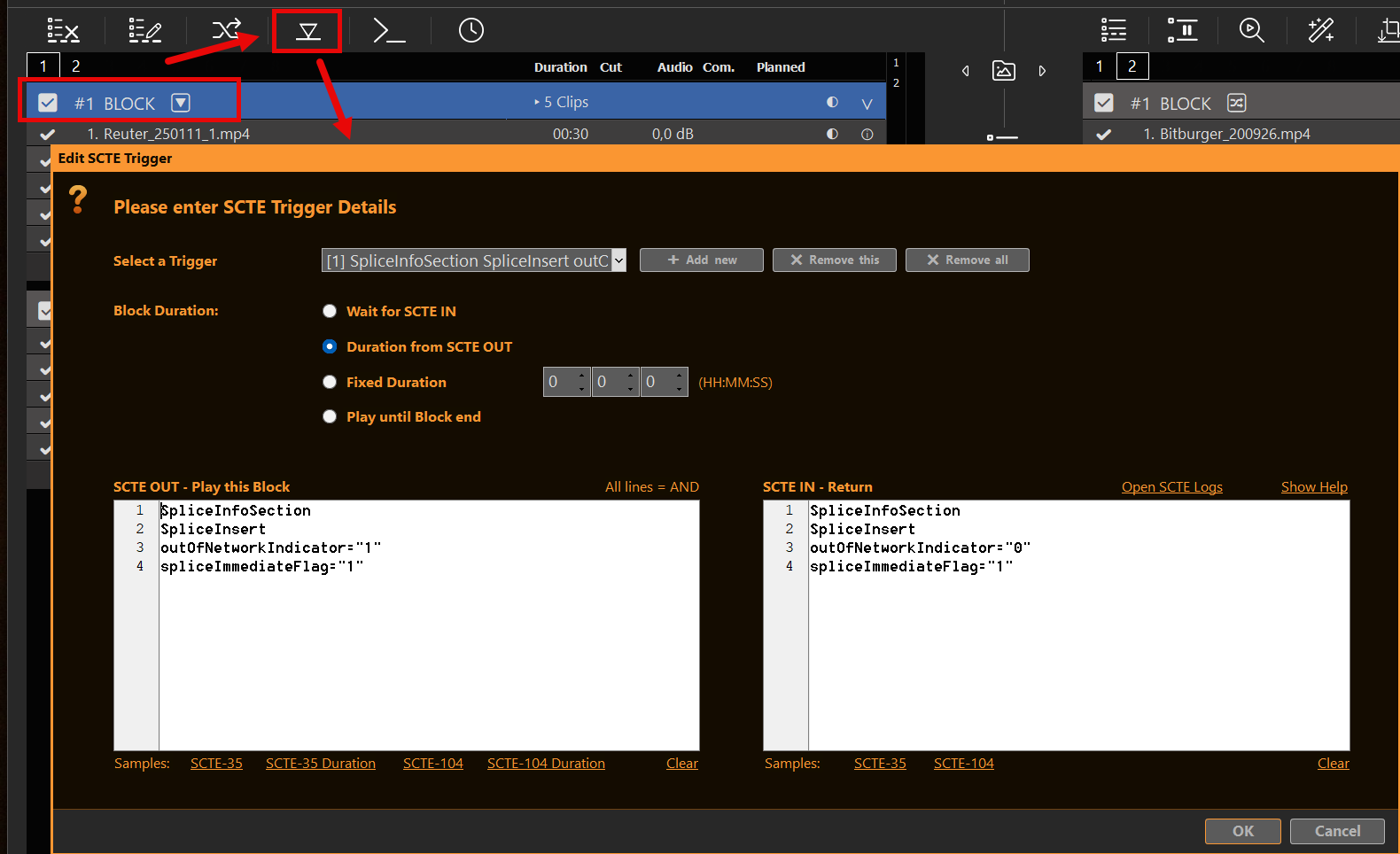
Select the Break Block header and open Edit SCTE Trigger (playlist shows a small SCTE / 🔽 hint when triggers are saved).
How matching works
Each trigger has:
- SCTE OUT — Play this Block — pattern(s) that start the Break
- SCTE IN — Return — optional pattern(s) that end the Break early (depending on duration mode)
- Block Duration — how long the Break runs before return
Put one match string per line. Every non-empty line must appear in the incoming marker text (All lines = AND). Samples for SCTE-35 / SCTE-104 (and duration variants) are in the dialog — use them as a starting point, then trim to what your feed really sends.
Tip: open Logs → SCTE while testing. << shows what PLAYDECK actually received — copy distinctive fragments into your match lines.
Block Duration modes
| Mode | What happens |
|---|---|
| Wait for SCTE IN | OUT starts the Break. Return when an IN pattern matches. You must set Pattern IN. |
| Duration from SCTE OUT | OUT starts the Break. Return after the BreakDuration (or equivalent) carried in that OUT marker. If no duration is found, PLAYDECK falls back to waiting for IN (if you set one). |
| Fixed Duration | OUT starts the Break. Return after the time you enter (HH:MM:SS). |
| Play until Block end | OUT starts the Break. Return when the Break Block finishes normally (same idea as a scheduled/action Break reaching its end). |
When OUT fires, PLAYDECK remembers the clip that was playing and jumps into the Break. Return uses that saved position (via the Break’s After Break setting / normal return path).
Quick recipe (typical FAST / server cue)
- Commands on clips/blocks/Actions = send SCTE (
>>in the log). See SCTE-35 / SCTE-104 articles. - SCTE Triggers on a Break Block = react to incoming markers (
<<) and drive playout.
Both can live in the same project. A Break can still carry outbound SCTE commands at start/end if your packager also needs markers from PLAYDECK.
For live ingest that must survive the Break, use a permanent Channel Input (not a playlist stream URL) — see Ad Breaks → Ingest → ads → return.
Related
| Article | Topic |
|---|---|
| Closed Captions & SCTE — Overview | Full matrix, domains, embed flags |
| Sending SCTE-35 to a stream server | UDP/SRT/DVB, Nimble, HLS |
| Closed Captions & Subtitles | CC burn-in / pass-through |
| Recording CC & SCTE | MKV vs TS, sidecars, playback checks |
| Using SCTE-104 on SDI | SDI VANC markers |