

This article shows how to connect a broadcast switcher such as Ross Ultrix Carbonite to PLAYDECK using AMP (Advanced Media Protocol). PLAYDECK acts as a Generic DDR. The switcher lists clips and sends cue, play, stop, eject, jog, loop and record.
AMP is control only — it does not carry video. Route PLAYDECK program out to the switcher separately via SDI, NDI or HDMI.
In this article:
→ Enable AMP in PLAYDECK
→ Route video to the switcher
→ Configure the switcher (Carbonite)
→ Channel mapping
→ Panel commands
→ Clip list & IDs
→ Status and logging
→ Troubleshooting
Enable AMP in PLAYDECK
- Open Settings → Network → Incoming.
- Enable AMP Video Server.
- Keep the default port 3811, unless your switcher requires another port.
- Allow inbound TCP on that port from the switcher IP (Windows Firewall).
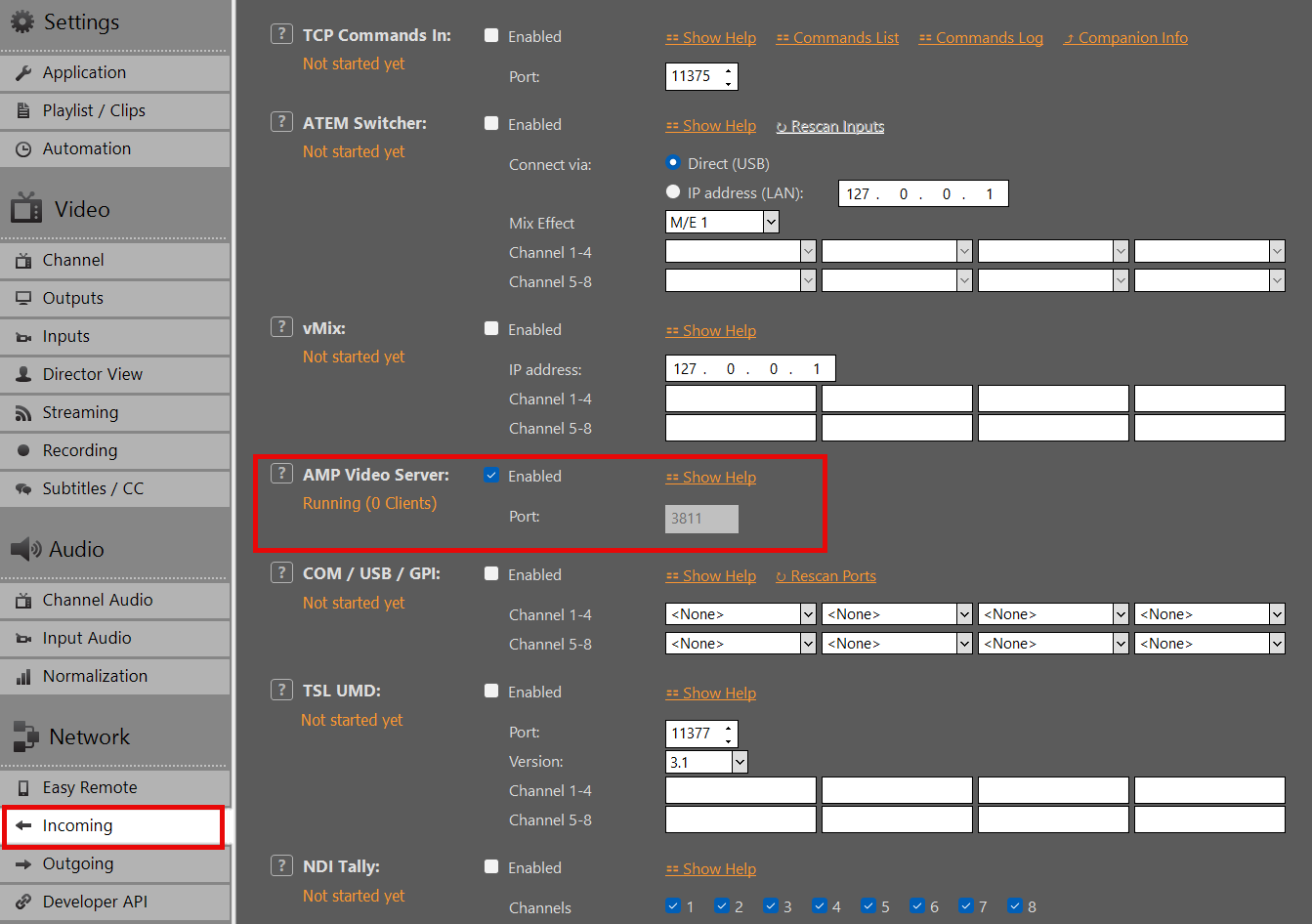
When AMP is active, PLAYDECK listens for switcher connections on the configured TCP port.
Route video to the switcher
AMP does not transport picture. You must feed the switcher from a normal PLAYDECK output:
- SDI / HDMI via a playout card (Blackmagic, AJA, Deltacast, …)
- NDI (see our Broadcast your Video Feed guide)
- Extended desktop / HDMI from the graphics card
Assign that source to the switcher input you use for the AMP device (e.g. BNC or NDI source from the PLAYDECK PC).
Configure the switcher (Carbonite)
On the Ross switcher (Ultrix Carbonite or compatible panel):
- Device Config → Add Server → AMP
- IP = PLAYDECK PC on the LAN
- Port = as set in PLAYDECK (default 3811)
- Protocol / server type: Generic DDR
- Enable Allow playlist control on the server side if the switcher asks for it
Ross Tria/Mira AMP documentation applies (driver AMP_0.2, Protocol ID Generic DDR).
Pick a VTR on the panel (e.g. Vtr1). Each AMP connection uses one VTR channel on the switcher.
Channel mapping
| Switcher | PLAYDECK |
|---|---|
| Vtr1 … Vtr8 | Channel 1 … 8 |
| PGM1 … PGM8 | Channel 1 … 8 (accepted too) |
One Carbonite AMP connection = one VTR. For multiple channels, add multiple AMP servers or VTR assignments as your switcher allows.
Panel commands
| Switcher | PLAYDECK |
|---|---|
| Play | Play |
| Stop | Pause (still). Play continues. |
| Eject | Stop the channel (background) |
| Cue | Cue that clip at Cut In |
| Jog / shuttle | Field/frame scrub (speed = how fast the panel sends steps; a firm twist is often only about play speed). Shuttle rate commands (if the panel sends them) = slow-mo to fast fwd/rev. Release = still. Play = 1×. Scrub feels smoother with more keyframes; reverse is heavier. |
| Loop on / off | Infinite loop / no loop on the current clip |
| Record | Start/stop the PLAYDECK recording whose source is this channel (not Always-on). Map that recording slot to the same playlist channel as the VTR. |
Status and logging
Status on the switcher follows PLAYDECK: Play, Pause, Cue.
Incoming AMP: Logs → Command Logs (<< AMP, readable).
Status and logging
Status on the switcher follows PLAYDECK: Play, Pause, Cue.
While a new clip is still caching, the previous clip may keep playing until cue is ready.
Incoming AMP traffic is logged under Logs → Command Logs (<< AMP).
Troubleshooting
| Problem | Check |
|---|---|
| Switcher cannot connect | AMP enabled in PLAYDECK; firewall allows TCP on the port; same LAN/subnet |
| Empty or wrong clip list | Clips active on the mapped channel; captions/filenames visible in playlist |
| Jog does nothing / stays at wrong speed | Clip cued or paused; after release it stays still (press Play for 1×). Soft scrub is normal for field-jog — not a fast shuttle. |
| Cue fails | Use the exact ID shown in the clip list (8-character or full long name on Carbonite/Tria-style) |
| Record does nothing | Recording slot: source = playlist, channel = this VTR, not Always-on; engine running |
| Picture black | Video not routed — AMP is control only; check SDI/NDI/HDMI to switcher |
| No log lines | Open Logs → Command Logs while testing |